# AgentZero Lite
**A minimalist IDE for the AI era — driving many CLIs side by side, from a single window.**
> 🇰🇷 한국어 문서: [README-KR.md](README-KR.md)
---
## ⚠️ Notice for Developers Reading This Source
If you are reading this source, you are a developer. AgentZero Lite is a **CLI helper that takes security as a first-class concern**:
- It has a **model download** feature, but **never transmits your data to external networks**.
- To prevent deployment tampering, **builds are produced transparently only through GitHub Actions** — there is no other release path.
- It does **not ship a risky auto-update mechanism** either.
**Is this actually true?** Don't take my word for it — **verify it yourself**, and if you find any risk, please open a GitHub issue at any time. Sub-modules that surface security warnings are wired into an AI improvement loop for fast follow-up, but the loop is not perfect. **Security-hardening contributions are always welcome.**
---
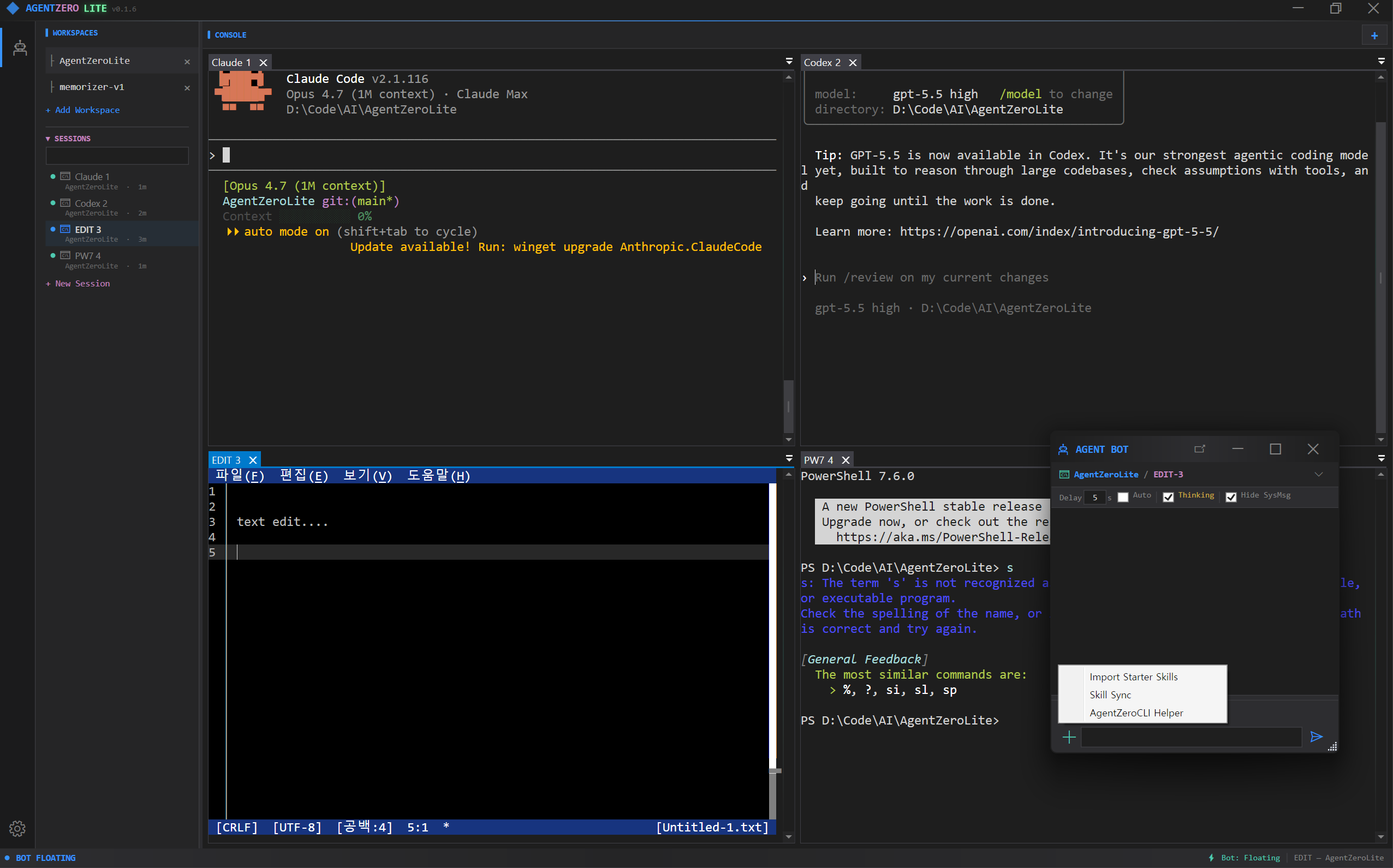
🎬 **Demo** — driving Claude and Codex in parallel:
 Pipe a single instruction to an AI CLI (Claude, Codex, any model you can run in
a shell) living in the same workspace — or in a different one — and have it act.
Run two different AI models side by side and let them talk to each other through
the same mechanism: cross-model dialogue, no custom broker required.
AgentZero Lite is a Windows desktop shell built around a simple idea: in the AI era most
of your day is spent *talking to command-line tools*. `claude`, `codex`, `gh`, `docker`,
`pwsh`, a REPL, a build log tail — each wants its own terminal, and you want all of them
visible at once without juggling windows. AgentZero Lite gives you a true multi-tab,
multi-workspace ConPTY terminal and a small chat surface that forwards text and skill
macros to whichever terminal is in focus — nothing more, nothing less.
---
## Features
- **Multi-tab ConPTY terminals** — real `conhost` rendering per tab, not a pseudo-PTY
pretending. Powered by `EasyWindowsTerminalControl` / `CI.Microsoft.Terminal.Wpf`.
- **Workspaces** — group tabs by folder so each project keeps its own set of CLIs
(one click = `cd` context and a fresh Claude).
- **AgentChatBot** (labelled **AgentCLI** in the UI from v0.9.1) — a dockable chat
pane that forwards whatever you type into the **active** terminal. `CHT` mode
types text, `KEY` mode forwards raw keystrokes (Ctrl+C, arrows, Tab). It is
**not** an AI; it is an input broker. *The rebrand is user-visible only — the
underlying actor path `/user/stage/bot` and `AgentBotActor` class names are
unchanged, so external scripts and skill macros keep working.*
- **AI ↔ AI conversation (the headline trick)** — teach `AgentZeroLite.ps1` to a
Claude tab or a Codex tab *once* ("learn `AgentZeroLite.ps1 help` and use it for
cross-terminal talk"), and from that point on either AI can greet the other
terminal *by name* and strike up a real dialogue. Claude in tab 0 writes to Codex
in tab 1, Codex replies back, each reads the peer's last output with
`terminal-read`. No extra broker, no cloud relay — just the two CLIs poking each
other through AgentZero's IPC. This is the tiki-taka between models that the Lite
edition exists for.
- **AIMODE — on-device LocalLLM as your in-shell coordinator** — flip the AgentBot
to AI mode (Shift+Tab) and a small on-device LLM (Gemma 4 today; Nemotron
staged) becomes a secretary that drives the *other* AI CLIs for you. You ask
in Korean or English, it picks the right terminal AI, sends the message,
waits, reads the reply, brings back a summary. Two-way channel: peer
terminals call back through the existing `bot-chat` CLI so the LocalLLM
doesn't have to keep polling. Nothing leaves the machine. See
[AIMODE section](#-aimode--locallm-as-your-in-shell-coordinator) below.
- **🎙 Voice — drive AgentBot hands-free while you keyboard the next tab** —
speak into your mic and AgentBot transcribes the audio locally (Whisper.net,
GGML small/medium models cached on disk) and types the text straight into
the active terminal AI. The point is **dual multitasking**: while one tab
takes your fingers (writing code, reading Claude's diff), the *other* tab
takes your voice. Two parallel AI conversations, one supervisor — same
AgentBot pipeline, just a different input channel. Backend ships **CPU +
Vulkan** so AMD / Intel / NVIDIA all accelerate the same binary; multi-GPU
systems get an auto-best heuristic plus a manual override in Voice settings.
**TTS reply** ships three backends — Windows SAPI (instant, offline),
OpenAI TTS (cloud, byok), and as of v0.9.2 **Supertonic** (Supertone Inc's
on-device ONNX, ~99M params, 10 voices, 31 languages incl. Korean) — the
first AgentZero provider that drives a **pip-installed Python package**
via a subprocess seam, opening up the wider Python on-device model
ecosystem for future adoption. Settings → Voice → Supertonic auto-discovers
installed Pythons (`py -0p` + filesystem fallback), exposes a Download
Model dialog with live progress + cancel + Start fresh, and a Check
Install probe that diagnoses multi-Python machines.
- **AgentBot `[+]` menu — 3 ways to arm a terminal AI** —
- **`AgentZeroCLI Helper`** — drops a ready-made briefing into the chat input that
teaches any terminal AI (Claude, Codex, shell-hosted model) how to call
`AgentZeroLite.exe -cli` once, no skill install. Review, hit Send, done. If the
CLI is not on PATH the menu nudges you to *Settings → Register PATH* and
restart first.
- **`Import Starter Skills`** — copies the shipped `agent-zero-lite` skill into
the active workspace's `.claude/skills/` so Claude Code picks it up persistently
on next session.
- **`Skill Sync`** — with Claude already running in a tab, reads the skill list
out of its own `/skills` view and turns it into a slash-command menu in the
chat box. Type `/`, pick a skill, Enter — the macro text is fired at the
terminal. No LLM round-trip.
- **🌐 WebDev — in-app browser sandbox + plugin system (v0.4)** — top-level menu
next to AgentBot. Embeds a WebView2 with a `window.zero.*` JavaScript bridge
to AgentZero's native services (LLM chat / streaming, TTS, STT-with-VAD,
summarize). Two install channels: a local `.zip`, or a public GitHub folder
URL (no `git` CLI required — the installer talks raw HTTP + Trees API).
First reference plugin is **voice-note** under
[`Project/Plugins/voice-note/`](Project/Plugins/voice-note/) — a STT-driven
voice journal with VAD-gated capture, sensitivity slider, pause/resume, LLM
summary (length-chunked recursive), and IndexedDB note storage. See the
[WebDev section](#-webdev--in-app-sandbox--plugin-system) below.
- **🔎 Scrap — window spy + scroll-aware text capture (v0.9.1)** — drag a
crosshair onto any visible window (or paste an HWND) and Scrap pulls the
readable text out, including auto-scroll for long content. Four capture
strategies in order: UIA `TextPattern`, focused-area UIA scroll, **clipboard
scroll** (Ctrl+Home → Ctrl+A/C + PageDown loop, works on IntelliJ / Chrome /
VS Code / anywhere Ctrl+A is supported), and a `WM_VSCROLL` fallback. Each
capture lands as a timestamped `logs/scrap/*.txt` and the preview pane fills
*live* as the scroll advances. The original clipboard is restored when the
capture finishes. See the [Scrap section](#-scrap--window-spy--text-capture)
below.
- **Notes with live rendering** — a second bottom panel with a Markdown viewer that
also renders Mermaid diagrams and Pencil files, scoped to the active workspace
folder.
- **CLI remote-control** — run `AgentZeroLite.exe -cli terminal-send 0 0 "npm test"`
from any script and drive the GUI over `WM_COPYDATA` + memory-mapped files.
- **Actor model (Akka.NET)** — terminal lifecycle, workspace routing and chat input
all run through supervised actors, so a crashing session does not take the window
down with it.
- **One executable, one process** — single-instance guard, SQLite for config, zero
external dependencies beyond the .NET 10 runtime. The build is under ~60 MB.
---
## Screenshot of the mental model
```
+--------------------------------------------------------------------------+
| AgentZero - □ × |
+---+------------+-----------------------------------------------+--------+
| | WORKSPACES | [Claude1] [pwsh1] [build-log] [+] | |
| ⚙ | ▸ monorepo +-----------------------------------------------+ |
| 🤖 | ▸ web | | |
| | ▸ api | ConPTY terminal (active tab) | |
| | ▸ blog | | |
| | | | |
| | SESSIONS +-----------------------------------------------+ |
| | · Claude1 | AGENT BOT ▾ | OUTPUT | LOG | NOTE |
| | · pwsh1 +-----------------------------------------------+ |
| | | > /skills | |
| | | [skill list] | |
| | | > run tests and summarize [Send] |
+---+------------+-----------------------------------------------+--------+
```
Top bar: ConPTY terminals, one per tab. Left rail: activity icons + sidebar with
workspaces and sessions. Bottom panel: tabbed — AGENT BOT (text/key sender to the
active terminal), OUTPUT, LOG, NOTE (per-workspace markdown viewer).
---
## Architecture
```
┌─ AgentZeroWpf (WinExe, WPF, net10.0-windows) ───────────────────────────┐
│ │
│ MainWindow ──── hosts N ConPTY tabs ──── AgentBotWindow (dock/float) │
│ │ │ │
│ │ WM_COPYDATA + MMF <─ CliHandler.cs ──> │ │
│ │ (external scripts drive the GUI) │ │
│ ▼ ▼ │
│ ActorSystemManager (Akka.NET) │
└──────────────────────┬──────────────────────────────────────────────────┘
│ ProjectReference
┌─ ZeroCommon (ClassLib, net10.0) ────────────────────────────────────────┐
│ Actors/ Stage → Workspace(N) → Terminal(N) + AgentBot (1) │
│ Services/ ITerminalSession, AgentEventStream, AppLogger │
│ Data/ AppDbContext + EF Core (SQLite) │
│ CliDefinition / CliGroup / CliTab / ClipboardEntry │
│ Module/ CliTerminalIpcHelper, CliWorkspacePersistence, ... │
└─────────────────────────────────────────────────────────────────────────┘
```
`ZeroCommon` is UI-free and covered by its own headless test project
(`ZeroCommon.Tests`, xUnit + Akka.TestKit). `AgentTest` covers the WPF-dependent
surface.
### Actor topology
```
/user/stage — supervisor, lifecycle broker, one per app
/bot — AgentBotActor: UI gateway (Chat/Key mode,
UI callback, peer routing). Spawns AgentLoop lazily.
/loop — AgentLoopActor: THE agent. Owns one IAgentLoop,
drives Idle→Thinking→Generating→Acting→Done FSM.
/ws- — WorkspaceActor: owns terminals in a folder
/term- — TerminalActor: wraps one ITerminalSession
```
Messages are defined in one place (`ZeroCommon/Actors/Messages.cs`).
Canonical agent vocabulary table — `harness/knowledge/_shared/agent-architecture.md`.
---
## Project layout
| Project | Path | Kind | Namespace |
|--------------------------|-----------------------------|----------------------------------|----------------------|
| **AgentZeroWpf** | `Project/AgentZeroWpf/` | WinExe (net10.0-windows, WPF) | `AgentZeroWpf.*` |
| **ZeroCommon** | `Project/ZeroCommon/` | ClassLib (net10.0, UI-free) | `Agent.Common.*` |
| **AgentTest** | `Project/AgentTest/` | xUnit (net10.0-windows) | `AgentTest.*` |
| **ZeroCommon.Tests** | `Project/ZeroCommon.Tests/` | xUnit (net10.0, headless) | `ZeroCommon.Tests.*` |
Reference graph: `AgentTest → AgentZeroWpf → ZeroCommon ← ZeroCommon.Tests`. Anything
without WPF / Win32 dependencies belongs in ZeroCommon.
---
## Build & run
Requirements: Windows 10/11, [.NET 10 SDK](https://dotnet.microsoft.com/), a terminal
that can run `dotnet`. Rider or Visual Studio 2022 17.11+ works; see the IDE note
below about disabling "Terminal Mode" when debugging.
```bash
# Restore + build the WPF app (auto-builds ZeroCommon as a project reference)
dotnet build Project/AgentZeroWpf/AgentZeroWpf.csproj -c Debug
# Release build (required before using the CLI wrapper script)
dotnet build Project/AgentZeroWpf/AgentZeroWpf.csproj -c Release
# Launch the GUI
Project/AgentZeroWpf/bin/Debug/net10.0-windows/AgentZeroLite.exe
# Run headless tests (shared logic)
dotnet test Project/ZeroCommon.Tests/ZeroCommon.Tests.csproj
# Run WPF-dependent tests (actors, terminal sessions, approval parser)
dotnet test Project/AgentTest/AgentTest.csproj
```
### ⚠️ IDE note — turn off Terminal Mode when debugging
AgentZero hosts its own ConPTY terminals inside WPF. If your IDE attaches its own
terminal to the process stdin/stdout/stderr (Rider's default, VS "Redirect standard
output", VS Code's integrated terminal when launched directly), it will **intercept
the console events that ConPTY needs to own**, and tabs will either refuse to start or
show garbled output.
**Always disable the IDE's terminal attachment before you press Run / Debug:**
| IDE | Setting |
|----------------|-------------------------------------------------------------------|
| **Rider** | Run / Debug configuration → **Use external console = ON** (`USE_EXTERNAL_CONSOLE=1` in `.run.xml`) |
| **Visual Studio** | Project Properties → Debug → **Uncheck "Use the standard console"** / **Redirect standard output** |
| **VS Code** | In `launch.json`, set `"console": "externalTerminal"` (do **not** use `"internalConsole"`) |
TL;DR — give the child process its own real console window. `dotnet run` from a
normal shell also works because it does not steal stdio.
---
## CLI — drive the GUI from any script
Every scriptable action goes through `AgentZeroLite.exe -cli `. The GUI must
be running; the CLI speaks to it over `WM_COPYDATA` (marker `0x414C "AL"`) and reads
responses back from named memory-mapped files. A 5-second poll timeout protects
scripts from a hung GUI; add `--no-wait` for fire-and-forget.
| Command | What it does |
|---------------------------------|-----------------------------------------------------------|
| `status` | JSON dump of GUI state (workspace count, status bar) |
| `copy` | Copy the last clipboard buffer into the system clipboard |
| `open-win` / `close-win` | Show or hide the main window |
| `console` | Open a fresh PowerShell in the app directory |
| `log [--last N] [--clear]` | CLI action history (file-backed) |
| `terminal-list` | JSON list of all workspace/tab sessions |
| `terminal-send "text"` | Send text to tab `` in workspace `` |
| `terminal-key ` | Send a control key (Ctrl+C, Enter, Tab, arrows, …) |
| `terminal-read [-n N]` | Read the last N bytes from a tab's scrollback |
| `bot-chat [--from X] "text"` | Display an external chat bubble in the bot window |
| `os [args]` | OS-control: window enum, screenshot, UIA, mouse, keypress |
| `help` | Command reference |
A PowerShell wrapper is shipped at `Project/AgentZeroWpf/AgentZeroLite.ps1` for convenience
once the app directory is on `PATH` (do this from the Settings pane: **AgentZero CLI →
Register PATH**).
---
## 🖥 OS-Control — drive Windows from CLI or LLM
The `os` verb group (mission **M0014**) imports the desktop-automation
surface from AgentZero Origin and bolts it on to *both* the CLI and the
on-device LLM agent loop. Every read-only verb is symmetrical: shell
calls and LLM tool calls touch the same code path, log to the same
audit JSONL, and write the same screenshot files.
```powershell
# Enumerate visible windows
AgentZeroLite.exe -cli os list-windows --filter "AgentZero"
# Capture a PNG of the whole desktop (grayscale, downscaled to 1920×1080)
AgentZeroLite.exe -cli os screenshot
# Inspect a window's UI Automation tree
AgentZeroLite.exe -cli os element-tree 0x000A0234 --depth 5
# Press Alt+F4 (input simulation — gated)
$env:AGENTZERO_OS_INPUT_ALLOWED = "1"
AgentZeroLite.exe -cli os keypress alt+f4
```
**LLM tools** (callable from AIMODE): `os_list_windows`,
`os_screenshot`, `os_activate`, `os_element_tree`, `os_mouse_click`,
`os_key_press`. The two `os_mouse_*` / `os_key_*` tools are gated by
the same env var as the CLI; a denied call returns
`{"ok":false,"error":"…gate denied…"}` and the system prompt forbids
retrying. Read-only tools are unconditional.
**Artefacts** land under `tmp/os-cli/`:
```
tmp/os-cli/
├── audit/.jsonl every CLI/LLM call recorded as one line
├── screenshots// PNG outputs
└── e2e/.log smoke summary (acceptance probe)
```
**E2E acceptance probe**: `Docs/scripts/launch-self-smoke.ps1`
uses the new verbs to verify a fresh build is reachable from the
desktop. Read-only — no driving, no input simulation. Run it after any
CLI / build change that touches the OS surface.
Full reference: [`Docs/OsControl.md`](Docs/OsControl.md).
Internal architecture notes: `harness/knowledge/_shared/os-control.md`.
---
## Making two AI CLIs talk to each other
This is the Lite edition's signature use case and it takes about one minute to set up.
1. **Register the CLI path once.** Open Settings → *AgentZero CLI* → click
`Register PATH`. Now `AgentZeroLite.ps1` resolves from any shell.
2. **Open two AI tabs in the same workspace.** For example, group 0 tab 0 =
`claude`, group 0 tab 1 = `codex` (any AI CLI that accepts natural-language
instructions works).
3. **Teach each AI the tool.** In each tab, paste one line:
> Learn `AgentZeroLite.ps1 help` and use it for cross-terminal talk.
> Use `terminal-list` to see the tabs, `terminal-send "text"` to
> speak to another AI tab by name, and `terminal-read --last 2000`
> to read the peer's reply.
4. **Start the dialogue.** In the Claude tab say:
*"Greet the tab named Codex and propose we co-design a REST endpoint."*
Claude will run `AgentZeroLite.ps1 terminal-send 0 1 "hi Codex, ..."`.
Codex sees it at its prompt, composes a reply, and sends it back with
`terminal-send 0 0 "..."`. You watch the conversation stream in both tabs.
What makes this work:
- Each AI runs in its **own ConPTY** — no shared memory, no context leakage.
- Messages traverse **AgentZero's IPC** (`WM_COPYDATA` + memory-mapped files),
not a cloud relay; nothing leaves your machine.
- The tab layout means you can interrupt, nudge, or splice in at any step —
the human stays the supervisor.
- Because the broker is just a shell command the AI already understands,
you can swap `claude` for any CLI-native agent (Aider, Copilot, a local
`ollama` chat, …) and keep the same protocol.
This is the "tiki-taka between models" the Lite edition was built for. Terminal
multiplexers let you *watch* many prompts; AgentZero Lite lets them **talk**.
---
## 🧠 AIMODE — LocalLLM as your in-shell coordinator
The next step up from "teach two CLIs to talk to each other" is "have a small
on-device LLM coordinate the conversation for you." That is **AIMODE** —
flip the AgentBot pane with **Shift+Tab** and a Gemma 4 (Nemotron staged)
running on your GPU/CPU becomes a tiny in-app secretary that drives the
real AI CLIs on your behalf.
> **Philosophy.** The LocalLLM here is **not trying to out-think Claude or
> Codex**. The goal is the *small secretary* role: take the fuzzy ask,
> route it to the right terminal AI, organise the result. Less than a PM,
> more than a bash alias. The heavy reasoning lives in those bigger CLIs;
> the LocalLLM is the receptionist who knows everyone's extension number
> and the protocol for transferring calls.
### What it looks like
```
+----------------------+
| You (user) |
+----------+-----------+
| chat: "claude한테 토론해줘", "hi", ...
v
+----------------------------+----------------------------+
| AgentBot AIMODE (chat pane) |
| |
| +----------------------+ Tool catalog |
| | LocalLLM | list_terminals |
| | Gemma 4 / Nemotron | --- read_terminal |
| | on-device | send_to_terminal |
| | GBNF-constrained | send_key wait done |
| | one JSON call/turn | |
| +----------+-----------+ |
| | Tell |
| v |
| +-------------------------------------------------+ |
| | AgentLoopActor (Akka FSM, /bot/loop) | |
| | Idle -> Thinking -> Generating -> Acting -> Done |
| | owns KV cache; ONE cycle per StartAgentLoop | |
| +-------------------------------------------------+ |
+----------------------------+----------------------------+
| ConPTY (write text + Enter)
v
+-----------------+ +-----------------+
| Claude (tab) |<->| Codex (tab) | ...
| the smart one | | the other one |
+--------+--------+ +--------+--------+
| replies via the existing CLI
v
AgentZeroLite.exe -cli bot-chat "DONE(text)" --from
|
| WM_COPYDATA (existing CLI/IPC channel)
v
MainWindow.HandleBotChat
-> /user/stage/bot.Tell(TerminalSentToBot)
-> AgentLoop wakes for a continuation cycle
```
### How an LLM becomes an Agent — the function-call tool chain
A bare LLM is a text-completion engine. **It is not an agent.** To make it
act on the world you have to do four things:
1. **Constrain its output** to a tool surface. Here, a GBNF grammar forces
every emission to be `{"tool": "", "args": { ... }}` and nothing
else. The sampler literally cannot produce free-form prose.
2. **Run the tool** and capture the result.
3. **Feed the result back** into the LLM's context as the next user turn.
4. **Repeat** until the LLM emits `done`.
That generate → tool → result → generate-again loop is what turns
text completion into agency. AgentZero's recipe lives in
`Project/ZeroCommon/Llm/Tools/`:
| Layer | Role |
|-------|------|
| `AgentToolGrammar.Gbnf` | GBNF grammar — sampler can only emit valid tool-call JSON |
| Tool surface (6 tools) | `list_terminals`, `read_terminal`, `send_to_terminal`, `send_key`, `wait`, `done` |
| `IAgentLoop` | Backend-agnostic contract: `RunAsync(userRequest) → AgentLoopRun`. Two impls: `LocalAgentLoop` (LLamaSharp + GBNF) and `ExternalAgentLoop` (OpenAI-compatible REST). |
| `IAgentToolbelt` | The side-effect surface the agent acts against — the 6 tools above are dispatched here. Production = `WorkspaceTerminalToolHost`; tests = `MockAgentToolbelt`. |
| `AgentLoopActor` | Akka wrapper at `/user/stage/bot/loop` — live progress, cancellation, KV cache, peer-signal continuation |
| System prompt (Mode 1 / Mode 2) | Teaches the model when to chat directly vs relay to a terminal AI |
| Handshake protocol | Verifies the reverse channel works before substantive relay |
**One cycle per run** is the central rule: each `StartAgentLoop` does ONE
short round-trip with a peer (send → wait → read → react → done) and then
stops. Subsequent cycles are triggered by the user OR an arriving peer
signal — never by the LLM trying to script a 5-turn discussion in one
giant tool chain. KV cache preserves history across cycles.
### Two-way channel — peer terminal AI talks back via CLI
The novel piece: the terminal AI (Claude in a tab, Codex in a tab) can
**push messages back to AgentBot** via the existing `bot-chat` CLI. When
AgentBot first contacts a terminal it sends a handshake header explaining:
> You are **Claude** and I am AgentBot.
> Step 1 — verify the channel: `AgentZeroLite.exe -cli help`
> Step 2 — acknowledge: `AgentZeroLite.exe -cli bot-chat "DONE(handshake-ok)" --from Claude`
When that command runs, the message routes through `WM_COPYDATA` →
`MainWindow.HandleBotChat` → `Tell(TerminalSentToBot)` to the bot actor.
If the peer is in an active conversation, the Reactor wakes for a fresh
continuation cycle. **Polling the visible terminal output (`read_terminal`)
is the *fallback*** for peers that don't or can't emit the signal.
This makes the terminal AI an active participant — it can *delay* its
reply (long compile, big refactor) and call back when ready, instead of
forcing AgentBot to repeatedly poll a `Crafting…` indicator.
### Tested scenarios (live, Gemma 4)
- **T5G** — greetings stay direct: `"안녕"` → bot replies in chat,
never routes to a terminal.
- **T6G** — five sequential continuation cycles, each ≤ 6 tool
iterations (one cycle per run, not one giant run for the whole
conversation).
- **T7G** — vague Mode 2 asks (`"Claude한테 토론 시작해"`) still
trigger `send_to_terminal` with a reasonable opener instead of
bouncing the request back at the user.
42/42 headless tests + the live suite above gate every change to the
loop / actor / prompt.
---
## 🎙 Voice — dual multitasking, hands & voice in parallel
Voice input is wired straight into AgentBot. You speak, the audio is
transcribed **locally** (no cloud, Whisper.net offline GGML models cached
on disk), and the resulting text takes the same path as if you had typed
it into the chat box — straight to whichever AI CLI tab is active.
**Why it matters — this is the dual-multitask play:** while one terminal
is taking your *keyboard* (writing code, navigating files, code-reviewing
Claude's diff), you can drive a *second* terminal with your *voice*
without lifting your hands. Two parallel AI conversations supervised by
one human, two distinct input channels. AIMODE's tiki-taka between models
extends here into tiki-taka between **your own two input modalities**.
```
┌─ Tab 0 ─ Claude (keyboard) ──┐ ┌─ Tab 1 ─ Codex (voice) ──────┐
│ you type: │ │ you say into the mic: │
│ "refactor this function …" │ │ "오늘 작업한 PR 요약해줘" │
│ │ │ │ │ │
│ ▼ │ │ ▼ Whisper.net (Vulkan)│
│ Claude works │ │ AgentBot transcribes │
│ │ │ │ │ │
│ ▼ │ │ ▼ │
│ reply in tab 0 │ │ typed into tab 1 │
└──────────────────────────────┘ └──────────────────────────────┘
one supervisor (you), two streams running in parallel
```
### Stack
- **Whisper.net** — offline STT, GGML `small` (~466 MB) and `medium`
(~1.5 GB) models cached at `%USERPROFILE%\.ollama\models\agentzero\
whisper\`. Downloaded on first use.
- **CPU + Vulkan runtimes bundled** (~63 MB Vulkan added to the
installer). The Vulkan backend is **cross-vendor** — AMD / Intel /
NVIDIA all accelerate the same binary. CUDA isn't bundled (its
cuBLAS payload is ~750 MB; revisit later as on-demand download).
- **Multi-GPU support** — Voice settings exposes a GPU device picker.
*Auto* uses a vendor + VRAM heuristic to pick the best adapter
(NVIDIA discrete > AMD discrete > Intel Arc > Intel iGPU); on
laptops with dGPU + iGPU it correctly picks the dGPU. Manual
override is one click away.
- **Mic capture** — NAudio with VAD silence-segmentation; sensitivity
slider; persistent mute + system-volume control on the AskBot
toolbar.
- **Test harness** — `WhisperCpuVsGpuBenchmarkTests` runs the same
TTS sample through CPU and GPU and prints prep / transcribe / RT
factor / similarity, so you can verify the Vulkan runtime
actually loaded on your machine.
### Status: input ✓ · output ✓ (3 backends as of v0.9.2)
- ✅ **STT (you → terminal AI)** — shipping. Mic → AgentBot →
active terminal.
- ✅ **TTS (terminal AI → spoken reply)** — shipping. Three
backends in Settings → Voice:
- **Windows SAPI** — instant, offline, uses OS-installed voices.
- **OpenAI TTS** — `tts-1`, 11 voices, byok.
- **Supertonic** *(new in v0.9.2)* — Supertone Inc's on-device
ONNX TTS, ~99M params, 10 voices (M1–M5 / F1–F5), 31
languages incl. Korean. **First AgentZero provider that
drives a pip-installed Python library** through a
`python -c
Pipe a single instruction to an AI CLI (Claude, Codex, any model you can run in
a shell) living in the same workspace — or in a different one — and have it act.
Run two different AI models side by side and let them talk to each other through
the same mechanism: cross-model dialogue, no custom broker required.
AgentZero Lite is a Windows desktop shell built around a simple idea: in the AI era most
of your day is spent *talking to command-line tools*. `claude`, `codex`, `gh`, `docker`,
`pwsh`, a REPL, a build log tail — each wants its own terminal, and you want all of them
visible at once without juggling windows. AgentZero Lite gives you a true multi-tab,
multi-workspace ConPTY terminal and a small chat surface that forwards text and skill
macros to whichever terminal is in focus — nothing more, nothing less.
---
## Features
- **Multi-tab ConPTY terminals** — real `conhost` rendering per tab, not a pseudo-PTY
pretending. Powered by `EasyWindowsTerminalControl` / `CI.Microsoft.Terminal.Wpf`.
- **Workspaces** — group tabs by folder so each project keeps its own set of CLIs
(one click = `cd` context and a fresh Claude).
- **AgentChatBot** (labelled **AgentCLI** in the UI from v0.9.1) — a dockable chat
pane that forwards whatever you type into the **active** terminal. `CHT` mode
types text, `KEY` mode forwards raw keystrokes (Ctrl+C, arrows, Tab). It is
**not** an AI; it is an input broker. *The rebrand is user-visible only — the
underlying actor path `/user/stage/bot` and `AgentBotActor` class names are
unchanged, so external scripts and skill macros keep working.*
- **AI ↔ AI conversation (the headline trick)** — teach `AgentZeroLite.ps1` to a
Claude tab or a Codex tab *once* ("learn `AgentZeroLite.ps1 help` and use it for
cross-terminal talk"), and from that point on either AI can greet the other
terminal *by name* and strike up a real dialogue. Claude in tab 0 writes to Codex
in tab 1, Codex replies back, each reads the peer's last output with
`terminal-read`. No extra broker, no cloud relay — just the two CLIs poking each
other through AgentZero's IPC. This is the tiki-taka between models that the Lite
edition exists for.
- **AIMODE — on-device LocalLLM as your in-shell coordinator** — flip the AgentBot
to AI mode (Shift+Tab) and a small on-device LLM (Gemma 4 today; Nemotron
staged) becomes a secretary that drives the *other* AI CLIs for you. You ask
in Korean or English, it picks the right terminal AI, sends the message,
waits, reads the reply, brings back a summary. Two-way channel: peer
terminals call back through the existing `bot-chat` CLI so the LocalLLM
doesn't have to keep polling. Nothing leaves the machine. See
[AIMODE section](#-aimode--locallm-as-your-in-shell-coordinator) below.
- **🎙 Voice — drive AgentBot hands-free while you keyboard the next tab** —
speak into your mic and AgentBot transcribes the audio locally (Whisper.net,
GGML small/medium models cached on disk) and types the text straight into
the active terminal AI. The point is **dual multitasking**: while one tab
takes your fingers (writing code, reading Claude's diff), the *other* tab
takes your voice. Two parallel AI conversations, one supervisor — same
AgentBot pipeline, just a different input channel. Backend ships **CPU +
Vulkan** so AMD / Intel / NVIDIA all accelerate the same binary; multi-GPU
systems get an auto-best heuristic plus a manual override in Voice settings.
**TTS reply** ships three backends — Windows SAPI (instant, offline),
OpenAI TTS (cloud, byok), and as of v0.9.2 **Supertonic** (Supertone Inc's
on-device ONNX, ~99M params, 10 voices, 31 languages incl. Korean) — the
first AgentZero provider that drives a **pip-installed Python package**
via a subprocess seam, opening up the wider Python on-device model
ecosystem for future adoption. Settings → Voice → Supertonic auto-discovers
installed Pythons (`py -0p` + filesystem fallback), exposes a Download
Model dialog with live progress + cancel + Start fresh, and a Check
Install probe that diagnoses multi-Python machines.
- **AgentBot `[+]` menu — 3 ways to arm a terminal AI** —
- **`AgentZeroCLI Helper`** — drops a ready-made briefing into the chat input that
teaches any terminal AI (Claude, Codex, shell-hosted model) how to call
`AgentZeroLite.exe -cli` once, no skill install. Review, hit Send, done. If the
CLI is not on PATH the menu nudges you to *Settings → Register PATH* and
restart first.
- **`Import Starter Skills`** — copies the shipped `agent-zero-lite` skill into
the active workspace's `.claude/skills/` so Claude Code picks it up persistently
on next session.
- **`Skill Sync`** — with Claude already running in a tab, reads the skill list
out of its own `/skills` view and turns it into a slash-command menu in the
chat box. Type `/`, pick a skill, Enter — the macro text is fired at the
terminal. No LLM round-trip.
- **🌐 WebDev — in-app browser sandbox + plugin system (v0.4)** — top-level menu
next to AgentBot. Embeds a WebView2 with a `window.zero.*` JavaScript bridge
to AgentZero's native services (LLM chat / streaming, TTS, STT-with-VAD,
summarize). Two install channels: a local `.zip`, or a public GitHub folder
URL (no `git` CLI required — the installer talks raw HTTP + Trees API).
First reference plugin is **voice-note** under
[`Project/Plugins/voice-note/`](Project/Plugins/voice-note/) — a STT-driven
voice journal with VAD-gated capture, sensitivity slider, pause/resume, LLM
summary (length-chunked recursive), and IndexedDB note storage. See the
[WebDev section](#-webdev--in-app-sandbox--plugin-system) below.
- **🔎 Scrap — window spy + scroll-aware text capture (v0.9.1)** — drag a
crosshair onto any visible window (or paste an HWND) and Scrap pulls the
readable text out, including auto-scroll for long content. Four capture
strategies in order: UIA `TextPattern`, focused-area UIA scroll, **clipboard
scroll** (Ctrl+Home → Ctrl+A/C + PageDown loop, works on IntelliJ / Chrome /
VS Code / anywhere Ctrl+A is supported), and a `WM_VSCROLL` fallback. Each
capture lands as a timestamped `logs/scrap/*.txt` and the preview pane fills
*live* as the scroll advances. The original clipboard is restored when the
capture finishes. See the [Scrap section](#-scrap--window-spy--text-capture)
below.
- **Notes with live rendering** — a second bottom panel with a Markdown viewer that
also renders Mermaid diagrams and Pencil files, scoped to the active workspace
folder.
- **CLI remote-control** — run `AgentZeroLite.exe -cli terminal-send 0 0 "npm test"`
from any script and drive the GUI over `WM_COPYDATA` + memory-mapped files.
- **Actor model (Akka.NET)** — terminal lifecycle, workspace routing and chat input
all run through supervised actors, so a crashing session does not take the window
down with it.
- **One executable, one process** — single-instance guard, SQLite for config, zero
external dependencies beyond the .NET 10 runtime. The build is under ~60 MB.
---
## Screenshot of the mental model
```
+--------------------------------------------------------------------------+
| AgentZero - □ × |
+---+------------+-----------------------------------------------+--------+
| | WORKSPACES | [Claude1] [pwsh1] [build-log] [+] | |
| ⚙ | ▸ monorepo +-----------------------------------------------+ |
| 🤖 | ▸ web | | |
| | ▸ api | ConPTY terminal (active tab) | |
| | ▸ blog | | |
| | | | |
| | SESSIONS +-----------------------------------------------+ |
| | · Claude1 | AGENT BOT ▾ | OUTPUT | LOG | NOTE |
| | · pwsh1 +-----------------------------------------------+ |
| | | > /skills | |
| | | [skill list] | |
| | | > run tests and summarize [Send] |
+---+------------+-----------------------------------------------+--------+
```
Top bar: ConPTY terminals, one per tab. Left rail: activity icons + sidebar with
workspaces and sessions. Bottom panel: tabbed — AGENT BOT (text/key sender to the
active terminal), OUTPUT, LOG, NOTE (per-workspace markdown viewer).
---
## Architecture
```
┌─ AgentZeroWpf (WinExe, WPF, net10.0-windows) ───────────────────────────┐
│ │
│ MainWindow ──── hosts N ConPTY tabs ──── AgentBotWindow (dock/float) │
│ │ │ │
│ │ WM_COPYDATA + MMF <─ CliHandler.cs ──> │ │
│ │ (external scripts drive the GUI) │ │
│ ▼ ▼ │
│ ActorSystemManager (Akka.NET) │
└──────────────────────┬──────────────────────────────────────────────────┘
│ ProjectReference
┌─ ZeroCommon (ClassLib, net10.0) ────────────────────────────────────────┐
│ Actors/ Stage → Workspace(N) → Terminal(N) + AgentBot (1) │
│ Services/ ITerminalSession, AgentEventStream, AppLogger │
│ Data/ AppDbContext + EF Core (SQLite) │
│ CliDefinition / CliGroup / CliTab / ClipboardEntry │
│ Module/ CliTerminalIpcHelper, CliWorkspacePersistence, ... │
└─────────────────────────────────────────────────────────────────────────┘
```
`ZeroCommon` is UI-free and covered by its own headless test project
(`ZeroCommon.Tests`, xUnit + Akka.TestKit). `AgentTest` covers the WPF-dependent
surface.
### Actor topology
```
/user/stage — supervisor, lifecycle broker, one per app
/bot — AgentBotActor: UI gateway (Chat/Key mode,
UI callback, peer routing). Spawns AgentLoop lazily.
/loop — AgentLoopActor: THE agent. Owns one IAgentLoop,
drives Idle→Thinking→Generating→Acting→Done FSM.
/ws- — WorkspaceActor: owns terminals in a folder
/term- — TerminalActor: wraps one ITerminalSession
```
Messages are defined in one place (`ZeroCommon/Actors/Messages.cs`).
Canonical agent vocabulary table — `harness/knowledge/_shared/agent-architecture.md`.
---
## Project layout
| Project | Path | Kind | Namespace |
|--------------------------|-----------------------------|----------------------------------|----------------------|
| **AgentZeroWpf** | `Project/AgentZeroWpf/` | WinExe (net10.0-windows, WPF) | `AgentZeroWpf.*` |
| **ZeroCommon** | `Project/ZeroCommon/` | ClassLib (net10.0, UI-free) | `Agent.Common.*` |
| **AgentTest** | `Project/AgentTest/` | xUnit (net10.0-windows) | `AgentTest.*` |
| **ZeroCommon.Tests** | `Project/ZeroCommon.Tests/` | xUnit (net10.0, headless) | `ZeroCommon.Tests.*` |
Reference graph: `AgentTest → AgentZeroWpf → ZeroCommon ← ZeroCommon.Tests`. Anything
without WPF / Win32 dependencies belongs in ZeroCommon.
---
## Build & run
Requirements: Windows 10/11, [.NET 10 SDK](https://dotnet.microsoft.com/), a terminal
that can run `dotnet`. Rider or Visual Studio 2022 17.11+ works; see the IDE note
below about disabling "Terminal Mode" when debugging.
```bash
# Restore + build the WPF app (auto-builds ZeroCommon as a project reference)
dotnet build Project/AgentZeroWpf/AgentZeroWpf.csproj -c Debug
# Release build (required before using the CLI wrapper script)
dotnet build Project/AgentZeroWpf/AgentZeroWpf.csproj -c Release
# Launch the GUI
Project/AgentZeroWpf/bin/Debug/net10.0-windows/AgentZeroLite.exe
# Run headless tests (shared logic)
dotnet test Project/ZeroCommon.Tests/ZeroCommon.Tests.csproj
# Run WPF-dependent tests (actors, terminal sessions, approval parser)
dotnet test Project/AgentTest/AgentTest.csproj
```
### ⚠️ IDE note — turn off Terminal Mode when debugging
AgentZero hosts its own ConPTY terminals inside WPF. If your IDE attaches its own
terminal to the process stdin/stdout/stderr (Rider's default, VS "Redirect standard
output", VS Code's integrated terminal when launched directly), it will **intercept
the console events that ConPTY needs to own**, and tabs will either refuse to start or
show garbled output.
**Always disable the IDE's terminal attachment before you press Run / Debug:**
| IDE | Setting |
|----------------|-------------------------------------------------------------------|
| **Rider** | Run / Debug configuration → **Use external console = ON** (`USE_EXTERNAL_CONSOLE=1` in `.run.xml`) |
| **Visual Studio** | Project Properties → Debug → **Uncheck "Use the standard console"** / **Redirect standard output** |
| **VS Code** | In `launch.json`, set `"console": "externalTerminal"` (do **not** use `"internalConsole"`) |
TL;DR — give the child process its own real console window. `dotnet run` from a
normal shell also works because it does not steal stdio.
---
## CLI — drive the GUI from any script
Every scriptable action goes through `AgentZeroLite.exe -cli `. The GUI must
be running; the CLI speaks to it over `WM_COPYDATA` (marker `0x414C "AL"`) and reads
responses back from named memory-mapped files. A 5-second poll timeout protects
scripts from a hung GUI; add `--no-wait` for fire-and-forget.
| Command | What it does |
|---------------------------------|-----------------------------------------------------------|
| `status` | JSON dump of GUI state (workspace count, status bar) |
| `copy` | Copy the last clipboard buffer into the system clipboard |
| `open-win` / `close-win` | Show or hide the main window |
| `console` | Open a fresh PowerShell in the app directory |
| `log [--last N] [--clear]` | CLI action history (file-backed) |
| `terminal-list` | JSON list of all workspace/tab sessions |
| `terminal-send "text"` | Send text to tab `` in workspace `` |
| `terminal-key ` | Send a control key (Ctrl+C, Enter, Tab, arrows, …) |
| `terminal-read [-n N]` | Read the last N bytes from a tab's scrollback |
| `bot-chat [--from X] "text"` | Display an external chat bubble in the bot window |
| `os [args]` | OS-control: window enum, screenshot, UIA, mouse, keypress |
| `help` | Command reference |
A PowerShell wrapper is shipped at `Project/AgentZeroWpf/AgentZeroLite.ps1` for convenience
once the app directory is on `PATH` (do this from the Settings pane: **AgentZero CLI →
Register PATH**).
---
## 🖥 OS-Control — drive Windows from CLI or LLM
The `os` verb group (mission **M0014**) imports the desktop-automation
surface from AgentZero Origin and bolts it on to *both* the CLI and the
on-device LLM agent loop. Every read-only verb is symmetrical: shell
calls and LLM tool calls touch the same code path, log to the same
audit JSONL, and write the same screenshot files.
```powershell
# Enumerate visible windows
AgentZeroLite.exe -cli os list-windows --filter "AgentZero"
# Capture a PNG of the whole desktop (grayscale, downscaled to 1920×1080)
AgentZeroLite.exe -cli os screenshot
# Inspect a window's UI Automation tree
AgentZeroLite.exe -cli os element-tree 0x000A0234 --depth 5
# Press Alt+F4 (input simulation — gated)
$env:AGENTZERO_OS_INPUT_ALLOWED = "1"
AgentZeroLite.exe -cli os keypress alt+f4
```
**LLM tools** (callable from AIMODE): `os_list_windows`,
`os_screenshot`, `os_activate`, `os_element_tree`, `os_mouse_click`,
`os_key_press`. The two `os_mouse_*` / `os_key_*` tools are gated by
the same env var as the CLI; a denied call returns
`{"ok":false,"error":"…gate denied…"}` and the system prompt forbids
retrying. Read-only tools are unconditional.
**Artefacts** land under `tmp/os-cli/`:
```
tmp/os-cli/
├── audit/.jsonl every CLI/LLM call recorded as one line
├── screenshots// PNG outputs
└── e2e/.log smoke summary (acceptance probe)
```
**E2E acceptance probe**: `Docs/scripts/launch-self-smoke.ps1`
uses the new verbs to verify a fresh build is reachable from the
desktop. Read-only — no driving, no input simulation. Run it after any
CLI / build change that touches the OS surface.
Full reference: [`Docs/OsControl.md`](Docs/OsControl.md).
Internal architecture notes: `harness/knowledge/_shared/os-control.md`.
---
## Making two AI CLIs talk to each other
This is the Lite edition's signature use case and it takes about one minute to set up.
1. **Register the CLI path once.** Open Settings → *AgentZero CLI* → click
`Register PATH`. Now `AgentZeroLite.ps1` resolves from any shell.
2. **Open two AI tabs in the same workspace.** For example, group 0 tab 0 =
`claude`, group 0 tab 1 = `codex` (any AI CLI that accepts natural-language
instructions works).
3. **Teach each AI the tool.** In each tab, paste one line:
> Learn `AgentZeroLite.ps1 help` and use it for cross-terminal talk.
> Use `terminal-list` to see the tabs, `terminal-send "text"` to
> speak to another AI tab by name, and `terminal-read --last 2000`
> to read the peer's reply.
4. **Start the dialogue.** In the Claude tab say:
*"Greet the tab named Codex and propose we co-design a REST endpoint."*
Claude will run `AgentZeroLite.ps1 terminal-send 0 1 "hi Codex, ..."`.
Codex sees it at its prompt, composes a reply, and sends it back with
`terminal-send 0 0 "..."`. You watch the conversation stream in both tabs.
What makes this work:
- Each AI runs in its **own ConPTY** — no shared memory, no context leakage.
- Messages traverse **AgentZero's IPC** (`WM_COPYDATA` + memory-mapped files),
not a cloud relay; nothing leaves your machine.
- The tab layout means you can interrupt, nudge, or splice in at any step —
the human stays the supervisor.
- Because the broker is just a shell command the AI already understands,
you can swap `claude` for any CLI-native agent (Aider, Copilot, a local
`ollama` chat, …) and keep the same protocol.
This is the "tiki-taka between models" the Lite edition was built for. Terminal
multiplexers let you *watch* many prompts; AgentZero Lite lets them **talk**.
---
## 🧠 AIMODE — LocalLLM as your in-shell coordinator
The next step up from "teach two CLIs to talk to each other" is "have a small
on-device LLM coordinate the conversation for you." That is **AIMODE** —
flip the AgentBot pane with **Shift+Tab** and a Gemma 4 (Nemotron staged)
running on your GPU/CPU becomes a tiny in-app secretary that drives the
real AI CLIs on your behalf.
> **Philosophy.** The LocalLLM here is **not trying to out-think Claude or
> Codex**. The goal is the *small secretary* role: take the fuzzy ask,
> route it to the right terminal AI, organise the result. Less than a PM,
> more than a bash alias. The heavy reasoning lives in those bigger CLIs;
> the LocalLLM is the receptionist who knows everyone's extension number
> and the protocol for transferring calls.
### What it looks like
```
+----------------------+
| You (user) |
+----------+-----------+
| chat: "claude한테 토론해줘", "hi", ...
v
+----------------------------+----------------------------+
| AgentBot AIMODE (chat pane) |
| |
| +----------------------+ Tool catalog |
| | LocalLLM | list_terminals |
| | Gemma 4 / Nemotron | --- read_terminal |
| | on-device | send_to_terminal |
| | GBNF-constrained | send_key wait done |
| | one JSON call/turn | |
| +----------+-----------+ |
| | Tell |
| v |
| +-------------------------------------------------+ |
| | AgentLoopActor (Akka FSM, /bot/loop) | |
| | Idle -> Thinking -> Generating -> Acting -> Done |
| | owns KV cache; ONE cycle per StartAgentLoop | |
| +-------------------------------------------------+ |
+----------------------------+----------------------------+
| ConPTY (write text + Enter)
v
+-----------------+ +-----------------+
| Claude (tab) |<->| Codex (tab) | ...
| the smart one | | the other one |
+--------+--------+ +--------+--------+
| replies via the existing CLI
v
AgentZeroLite.exe -cli bot-chat "DONE(text)" --from
|
| WM_COPYDATA (existing CLI/IPC channel)
v
MainWindow.HandleBotChat
-> /user/stage/bot.Tell(TerminalSentToBot)
-> AgentLoop wakes for a continuation cycle
```
### How an LLM becomes an Agent — the function-call tool chain
A bare LLM is a text-completion engine. **It is not an agent.** To make it
act on the world you have to do four things:
1. **Constrain its output** to a tool surface. Here, a GBNF grammar forces
every emission to be `{"tool": "", "args": { ... }}` and nothing
else. The sampler literally cannot produce free-form prose.
2. **Run the tool** and capture the result.
3. **Feed the result back** into the LLM's context as the next user turn.
4. **Repeat** until the LLM emits `done`.
That generate → tool → result → generate-again loop is what turns
text completion into agency. AgentZero's recipe lives in
`Project/ZeroCommon/Llm/Tools/`:
| Layer | Role |
|-------|------|
| `AgentToolGrammar.Gbnf` | GBNF grammar — sampler can only emit valid tool-call JSON |
| Tool surface (6 tools) | `list_terminals`, `read_terminal`, `send_to_terminal`, `send_key`, `wait`, `done` |
| `IAgentLoop` | Backend-agnostic contract: `RunAsync(userRequest) → AgentLoopRun`. Two impls: `LocalAgentLoop` (LLamaSharp + GBNF) and `ExternalAgentLoop` (OpenAI-compatible REST). |
| `IAgentToolbelt` | The side-effect surface the agent acts against — the 6 tools above are dispatched here. Production = `WorkspaceTerminalToolHost`; tests = `MockAgentToolbelt`. |
| `AgentLoopActor` | Akka wrapper at `/user/stage/bot/loop` — live progress, cancellation, KV cache, peer-signal continuation |
| System prompt (Mode 1 / Mode 2) | Teaches the model when to chat directly vs relay to a terminal AI |
| Handshake protocol | Verifies the reverse channel works before substantive relay |
**One cycle per run** is the central rule: each `StartAgentLoop` does ONE
short round-trip with a peer (send → wait → read → react → done) and then
stops. Subsequent cycles are triggered by the user OR an arriving peer
signal — never by the LLM trying to script a 5-turn discussion in one
giant tool chain. KV cache preserves history across cycles.
### Two-way channel — peer terminal AI talks back via CLI
The novel piece: the terminal AI (Claude in a tab, Codex in a tab) can
**push messages back to AgentBot** via the existing `bot-chat` CLI. When
AgentBot first contacts a terminal it sends a handshake header explaining:
> You are **Claude** and I am AgentBot.
> Step 1 — verify the channel: `AgentZeroLite.exe -cli help`
> Step 2 — acknowledge: `AgentZeroLite.exe -cli bot-chat "DONE(handshake-ok)" --from Claude`
When that command runs, the message routes through `WM_COPYDATA` →
`MainWindow.HandleBotChat` → `Tell(TerminalSentToBot)` to the bot actor.
If the peer is in an active conversation, the Reactor wakes for a fresh
continuation cycle. **Polling the visible terminal output (`read_terminal`)
is the *fallback*** for peers that don't or can't emit the signal.
This makes the terminal AI an active participant — it can *delay* its
reply (long compile, big refactor) and call back when ready, instead of
forcing AgentBot to repeatedly poll a `Crafting…` indicator.
### Tested scenarios (live, Gemma 4)
- **T5G** — greetings stay direct: `"안녕"` → bot replies in chat,
never routes to a terminal.
- **T6G** — five sequential continuation cycles, each ≤ 6 tool
iterations (one cycle per run, not one giant run for the whole
conversation).
- **T7G** — vague Mode 2 asks (`"Claude한테 토론 시작해"`) still
trigger `send_to_terminal` with a reasonable opener instead of
bouncing the request back at the user.
42/42 headless tests + the live suite above gate every change to the
loop / actor / prompt.
---
## 🎙 Voice — dual multitasking, hands & voice in parallel
Voice input is wired straight into AgentBot. You speak, the audio is
transcribed **locally** (no cloud, Whisper.net offline GGML models cached
on disk), and the resulting text takes the same path as if you had typed
it into the chat box — straight to whichever AI CLI tab is active.
**Why it matters — this is the dual-multitask play:** while one terminal
is taking your *keyboard* (writing code, navigating files, code-reviewing
Claude's diff), you can drive a *second* terminal with your *voice*
without lifting your hands. Two parallel AI conversations supervised by
one human, two distinct input channels. AIMODE's tiki-taka between models
extends here into tiki-taka between **your own two input modalities**.
```
┌─ Tab 0 ─ Claude (keyboard) ──┐ ┌─ Tab 1 ─ Codex (voice) ──────┐
│ you type: │ │ you say into the mic: │
│ "refactor this function …" │ │ "오늘 작업한 PR 요약해줘" │
│ │ │ │ │ │
│ ▼ │ │ ▼ Whisper.net (Vulkan)│
│ Claude works │ │ AgentBot transcribes │
│ │ │ │ │ │
│ ▼ │ │ ▼ │
│ reply in tab 0 │ │ typed into tab 1 │
└──────────────────────────────┘ └──────────────────────────────┘
one supervisor (you), two streams running in parallel
```
### Stack
- **Whisper.net** — offline STT, GGML `small` (~466 MB) and `medium`
(~1.5 GB) models cached at `%USERPROFILE%\.ollama\models\agentzero\
whisper\`. Downloaded on first use.
- **CPU + Vulkan runtimes bundled** (~63 MB Vulkan added to the
installer). The Vulkan backend is **cross-vendor** — AMD / Intel /
NVIDIA all accelerate the same binary. CUDA isn't bundled (its
cuBLAS payload is ~750 MB; revisit later as on-demand download).
- **Multi-GPU support** — Voice settings exposes a GPU device picker.
*Auto* uses a vendor + VRAM heuristic to pick the best adapter
(NVIDIA discrete > AMD discrete > Intel Arc > Intel iGPU); on
laptops with dGPU + iGPU it correctly picks the dGPU. Manual
override is one click away.
- **Mic capture** — NAudio with VAD silence-segmentation; sensitivity
slider; persistent mute + system-volume control on the AskBot
toolbar.
- **Test harness** — `WhisperCpuVsGpuBenchmarkTests` runs the same
TTS sample through CPU and GPU and prints prep / transcribe / RT
factor / similarity, so you can verify the Vulkan runtime
actually loaded on your machine.
### Status: input ✓ · output ✓ (3 backends as of v0.9.2)
- ✅ **STT (you → terminal AI)** — shipping. Mic → AgentBot →
active terminal.
- ✅ **TTS (terminal AI → spoken reply)** — shipping. Three
backends in Settings → Voice:
- **Windows SAPI** — instant, offline, uses OS-installed voices.
- **OpenAI TTS** — `tts-1`, 11 voices, byok.
- **Supertonic** *(new in v0.9.2)* — Supertone Inc's on-device
ONNX TTS, ~99M params, 10 voices (M1–M5 / F1–F5), 31
languages incl. Korean. **First AgentZero provider that
drives a pip-installed Python library** through a
`python -c